For anyone seeking fast, reliable external storage, NVMe external enclosures offer a compact way to expand your SSD’s capabilities. The best options combine high transfer speeds, solid build quality, and easy installation—yet they differ significantly in features and price. The ASUS ROG Strix Arion stands out for its premium aluminum design and robust performance, while UGREEN’s Thunderbolt-compatible models excel in thermal management. Tradeoffs often involve balancing speed, compatibility, and cost, so understanding your specific needs makes all the difference. Keep reading for a detailed breakdown of the top choices in this category.

Get travel and outdoor gear delivered free — and shop member deals
- Fast, free delivery on millions of items
- Access to Prime Big Deal Days deals on October 6–7
- Prime Video, Amazon Music and more included
Complete the kit


Key Takeaways
- High transfer speeds are consistent across models supporting USB 3.2 Gen 2 and Thunderbolt 4, but thermal management varies significantly, impacting sustained performance.
- Tool-free installation remains a key feature for ease of use, especially for users frequently swapping drives.
- Build quality, notably aluminum versus plastic, directly influences durability and heat dissipation, affecting long-term reliability.
- Compatibility with various M.2 sizes and PCIe versions is widespread, but some enclosures support higher capacities and faster NVMe SSDs than others.
- Price often correlates with features like heat dissipation, interface speed, and included accessories; balancing these is crucial for value.
| ASUS ROG Strix Arion Aluminum Alloy M.2 NVMe SSD Enclosure Case Adapter, USB 3.2 Gen 2 Type-C, 10 Gbps, Includes Cables, Supports PCIe 2280/2260/2242/2230 M Key/B+M Key, 1 Year Warranty |  | Best Overall for Gaming and Customization | Interface: USB Type C | Hardware Platform: Asus ROG | Supported Devices: Laptop | VIEW ON AMAZON | See Our Full Breakdown |
| MAIWO M.2 NVMe SSD Enclosure, USB 3.1 Gen2, Tool-Free, Aluminum, Supports UASP & TRIM, 8TB Capacity |  | Best Value with High Capacity Support | Compatibility: M.2 NVMe M-Key SSD, sizes 2230/2242/2260/2280 | Transfer Speed: 10Gbps | Interface: USB 3.1 Gen2 (Type-C) | VIEW ON AMAZON | See Our Full Breakdown |
| UGREEN 40Gbps M.2 NVMe Enclosure with Aluminum Double-Sided Fin Heat Dissipation, No Noise External SSD Case for Thunderbolt 4/3/USB4/3.2/2.0, Compatible with M.2 NVMe SSDs (SSD Not Included) |  | Best for Ultra-Fast Transfer with Advanced Cooling | Transmission Speed: up to 3600MB/s | Interface: USB Type C | Supported Devices: Desktop, Gaming Console, Laptop, Smartphone, Tablet | VIEW ON AMAZON | See Our Full Breakdown |
| ORICO M.2 NVMe SSD Enclosure, USB 3.1 Gen 2 (10 Gbps) PCIe External Adapter for M.2 NVMe SSDs up to 8TB | 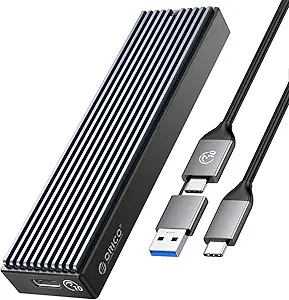 | Best Portable and Versatile Basic Enclosure | Hardware Interface: USB 3.1 Type C | Memory Storage Capacity: 8 TB | Supported Devices Quantity: 1 | VIEW ON AMAZON | See Our Full Breakdown |
| SSK M.2 NVMe SATA SSD Enclosure with RTL9210B Chip, USB 3.2 Gen 2, Aluminum, Supports 2242/2260/2280 |  | Best Versatile Support for NVMe and SATA SSDs | Supported SSD Types: NVMe PCIe & SATA M-Key/B+M key | Supported Sizes: 2242, 2260, 2280 | Interface: USB 3.2 Gen 2 Type-C | VIEW ON AMAZON | See Our Full Breakdown |
| UGREEN SSD Enclosure, Tool-Free USB-C External M.2 NVMe to USB Adapter/Reader |  | Best Overall for Versatility and Compatibility | Data Transfer Rate: 10Gbps | USB Version: USB 3.2 Gen2 | Compatibility: M.2 NVMe, B&M keys, sizes 2230/2242/2260/2280, up to 8TB | VIEW ON AMAZON | See Our Full Breakdown |
| M.2 NVMe SSD Enclosure, USB 3.2 Gen 2, Tool-Free Installation, Supports 2230/2242/2260/2280 SSDs |  | Best for Easy Use and Effective Cooling | Interface: USB 3.2 Gen 2 (10 Gbps) | Compatibility: M-Key and B+M Key NVMe SSDs, 2230/2242/2260/2280 | Material: Aluminum alloy with silicone thermal pad | VIEW ON AMAZON | See Our Full Breakdown |
| FIDECO M.2 NVMe SSD Enclosure, USB 3.2 Gen 2 (10Gbps), Tool-Free Installation, Supports M.2 NVMe SSDs (2230/2242/2260/2280) | 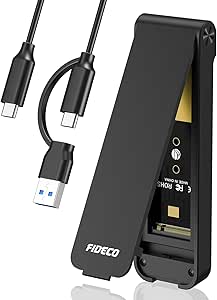 | Best for Thermal Performance and Compatibility with Multiple Sizes | Supported SSDs: M.2 NVMe, M and M+B keys, sizes 2230/2242/2260/2280 | Transfer Speed: Up to 10Gbps | Design: Sandwich style, tool-free | VIEW ON AMAZON | See Our Full Breakdown |
| UGREEN 10Gbps M.2 NVMe SSD Enclosure |  | Best Compact and Travel-Friendly NVMe Enclosure | Transfer Rate: 10Gbps | USB Version: USB 3.2 Gen2 | Compatibility: NVMe M.2 SSDs (2230/2242/2260/2280), up to 8TB | VIEW ON AMAZON | See Our Full Breakdown |
| Sabrent USB C NVMe Enclosure & Reader, Tool-Free M.2 PCIe SSD Case for 2230-2280 |  | Best for Heavy-Duty Use and High Performance | Hardware Interface: USB | Supported Devices: NVMe M.2 SSDs 2230-2280, up to 8TB | Material: Aluminum and ABS | VIEW ON AMAZON | See Our Full Breakdown |
| Sabrent USB 3.2 Type-C Enclosure for M.2 SSDs |  | Best Portable, Tool-Free NVMe Enclosure | Hardware Interface: USB 3.2 | Supported Devices: 1 M.2 SSD (NVMe or SATA) | Data Transfer Rate: 10 Gbps | VIEW ON AMAZON | See Our Full Breakdown |
| nvme external enclosure | Material | Compatibility |
|---|---|---|
| ASUS ROG Strix Arion Aluminum | — | — |
| MAIWO M.2 NVMe SSD Enclosure | Aluminum alloy | M.2 NVMe M-Key SSD, sizes 2230/2242/2260/2280 |
| UGREEN 40Gbps M.2 NVMe Enclosu | Aluminum | — |
| ORICO M.2 NVMe SSD Enclosure | — | — |
| SSK M.2 NVMe SATA SSD Enclosur | Aluminum alloy | Windows, Linux, Mac |
| UGREEN SSD Enclosure | Aluminum | M.2 NVMe, B&M keys, sizes 2230/2242/2260/2280, up to 8TB |
| M.2 NVMe SSD Enclosure | Aluminum alloy with silicone thermal pad | M-Key and B+M Key NVMe SSDs, 2230/2242/2260/2280 |
| FIDECO M.2 NVMe SSD Enclosure | — | Windows, Mac OS, Linux |
| UGREEN 10Gbps M.2 NVMe SSD Enc | Aluminum | NVMe M.2 SSDs (2230/2242/2260/2280), up to 8TB |
| Sabrent USB C NVMe Enclosure & | Aluminum and ABS | — |
| Sabrent USB 3.2 Type-C Enclosu | Aluminum | — |
More Details on Our Top Picks
ASUS ROG Strix Arion Aluminum Alloy M.2 NVMe SSD Enclosure Case Adapter, USB 3.2 Gen 2 Type-C, 10 Gbps, Includes Cables, Supports PCIe 2280/2260/2242/2230 M Key/B+M Key, 1 Year Warranty
The ASUS ROG Strix Arion stands out as the best overall choice for gamers and enthusiasts who value high performance combined with style. Its aluminum construction ensures excellent heat dissipation, while the Aura Sync RGB lighting offers customizable aesthetics that appeal to gamers. Compared to the UGREEN or ORICO enclosures, it also supports a broader range of M.2 sizes and provides a 10 Gbps transfer rate, making it suitable for demanding tasks. The tradeoff is that it doesn’t include an NVMe drive, and its compatibility relies on having a device with a USB-C port. This enclosure is ideal for users who want high-speed external storage with a flair for personalization.
Pros:- Supports multiple M.2 PCIe NVMe drives with high transfer speeds
- Screwdriver-free installation simplifies setup
- Effective heat dissipation with thermal pads and aluminum case
- Customizable RGB lighting via ASUS Aura Sync
Cons:- NVMe SSD not included, requiring additional purchase
- Limited to specific M.2 form factors (2230/2242/2260/2280)
Best for: Gamers and tech enthusiasts who want a stylish, high-performance external NVMe enclosure with RGB lighting
Not ideal for: Casual users seeking a budget-friendly, straightforward enclosure without lighting or aesthetic features
- Interface:USB Type C
- Hardware Platform:Asus ROG
- Supported Devices:Laptop
- Data Transfer Rate:10 Gbps
- Enclosure Material:Aluminum
- Warranty:1 year
Our verdict“This enclosure is perfect for gamers and power users who want fast, stylish external NVMe storage with customizable lighting.”
MAIWO M.2 NVMe SSD Enclosure, USB 3.1 Gen2, Tool-Free, Aluminum, Supports UASP & TRIM, 8TB Capacity
Compared to the UGREEN 40Gbps enclosure, the MAIWO M.2 NVMe SSD Enclosure offers a more affordable solution with support for drives up to 8TB, making it an excellent choice for users needing large storage at a lower cost. Its aluminum shell ensures good heat dissipation, and the tool-free design makes installation straightforward for most users. While it doesn’t support the ultra-fast 40Gbps speeds of Thunderbolt 4 devices, it comfortably delivers 10Gbps transfer rates, suitable for most daily workloads. A tradeoff is that it only supports M.2 NVMe M-Key SSDs, not SATA or other form factors, and it requires formatting. This makes it well-suited for users seeking high capacity and reliable performance without the highest speed ceiling.
Pros:- Supports high-speed 10Gbps data transfer
- Durable aluminum shell ensures good heat dissipation
- Easy tool-free installation for quick setup
- Compatible with Windows, Mac, and Linux
Cons:- Supports only NVMe M-Key SSDs, not SATA
- Requires formatting for new drives
Best for: Power users needing large external storage with reliable performance on a budget
Not ideal for: Creative professionals requiring maximum transfer speeds or Thunderbolt compatibility
- Compatibility:M.2 NVMe M-Key SSD, sizes 2230/2242/2260/2280
- Transfer Speed:10Gbps
- Interface:USB 3.1 Gen2 (Type-C)
- Material:Aluminum alloy
- Capacity Support:Up to 8TB
- Dimensions:11×3.75×1.25cm
Our verdict“This enclosure suits users who need large capacity external storage with solid performance at a reasonable price.”
UGREEN 40Gbps M.2 NVMe Enclosure with Aluminum Double-Sided Fin Heat Dissipation, No Noise External SSD Case for Thunderbolt 4/3/USB4/3.2/2.0, Compatible with M.2 NVMe SSDs (SSD Not Included)
The UGREEN 40Gbps M.2 NVMe Enclosure is the ideal choice for users who prioritize maximum data transfer speeds, especially those with Thunderbolt 4 or USB4 systems. Its double-sided fin design significantly enhances heat dissipation, allowing sustained high-speed performance without thermal throttling. It supports NVMe SSDs up to 8TB and is compatible with a wide range of systems, making it perfect for data-intensive tasks like video editing or large backups. However, to reach its peak speeds, users need Thunderbolt 4 or USB4 cables and ports, which can add to the setup cost. It’s a premium option best suited for professionals who demand the fastest external storage and are prepared with compatible hardware.
Pros:- Supports blazing-fast transfer speeds up to 40Gbps
- Effective double-sided fin heat dissipation design
- Compatible with multiple system types, including Thunderbolt 4/USB4
- Supports SSDs up to 8TB
Cons:- Requires Thunderbolt 4 or USB4 to achieve maximum speeds
- SSD not included, may need thermal pads for thicker drives
Best for: Professionals and power users needing the fastest external NVMe storage with advanced cooling
Not ideal for: Casual users or those with only USB 3.2 or older ports who won’t utilize the maximum speed
- Transmission Speed:up to 3600MB/s
- Interface:USB Type C
- Supported Devices:Desktop, Gaming Console, Laptop, Smartphone, Tablet
- Storage Capacity:up to 8TB
- Material:Aluminum
- Supported Systems:Windows, Mac OS, Linux, Android
Our verdict“This enclosure is best suited for professionals who need ultra-fast external NVMe storage with robust cooling support.”
ORICO M.2 NVMe SSD Enclosure, USB 3.1 Gen 2 (10 Gbps) PCIe External Adapter for M.2 NVMe SSDs up to 8TB
Compared to the MAIWO enclosure, the ORICO M.2 NVMe SSD Enclosure offers a straightforward, portable design that emphasizes ease of use and compatibility. Its aluminum and plastic combination keeps it lightweight, while still providing good heat dissipation. It supports NVMe M.2 SSDs up to 8TB, with transfer speeds reaching 10Gbps, suitable for everyday data transfer needs. The enclosure’s plug-and-play functionality makes it accessible even for beginners. However, it only supports NVMe drives and not SATA, and the plastic elements may be less durable over time. It’s an ideal pick for users seeking a simple, portable enclosure without extra features or RGB lighting.
Pros:- Supports high-speed data transfer up to 10 Gbps
- Lightweight, portable design
- Compatible with multiple operating systems
- Good heat dissipation for daily use
Cons:- Limited to NVMe M.2 SSDs, no SATA support
- Less durable over long-term use due to plastic parts
Best for: Travelers and casual users who need reliable, portable NVMe storage
Not ideal for: Power users or gamers seeking high customization or maximum speeds beyond 10Gbps
- Hardware Interface:USB 3.1 Type C
- Memory Storage Capacity:8 TB
- Supported Devices Quantity:1
- Data Transfer Rate:10 Gbps
- Color:Black
- Enclosure Material:Aluminum
- Item Dimensions:4.25″L x 1.16″W x 0.53″H
Our verdict“This enclosure offers a simple, portable solution for users needing dependable NVMe external storage on the go.”
SSK M.2 NVMe SATA SSD Enclosure with RTL9210B Chip, USB 3.2 Gen 2, Aluminum, Supports 2242/2260/2280
Unlike many enclosures that support only NVMe SSDs, the SSK M.2 NVMe SATA SSD Enclosure provides the flexibility to accommodate both NVMe PCIe and SATA M-Key/B+M key drives. Its aluminum build aids in heat dissipation, and it supports data transfer speeds up to 10Gbps via USB 3.2 Gen 2, comparable to other high-speed options like the ASUS ROG Strix Arion. The inclusion of thermal pads and a screwdriver simplifies setup, making it accessible for users who may switch between different SSD types. The main limitation is that it does not support non-M.2 form factors or older SATA drives, and its speed is capped by USB 3.2 Gen 2. This makes it a flexible choice for those needing support for multiple SSD types in one enclosure.
Pros:- Supports both NVMe PCIe and SATA M.2 SSDs
- High-speed transfer up to 10Gbps
- Durable aluminum shell for heat management
- Includes thermal pads and screwdriver for easy setup
Cons:- Does not support non-M.2 or older SATA drives
- Speed limited to USB 3.2 Gen 2 capabilities
Best for: Users who want to switch between NVMe and SATA M.2 SSDs without multiple enclosures
Not ideal for: Users seeking the absolute fastest transfer speeds or those with only SATA drives
- Supported SSD Types:NVMe PCIe & SATA M-Key/B+M key
- Supported Sizes:2242, 2260, 2280
- Interface:USB 3.2 Gen 2 Type-C
- Material:Aluminum alloy
- Transfer Speed:Up to 10Gbps
- Compatibility:Windows, Linux, Mac
Our verdict“This enclosure is an excellent choice for users needing flexible support for both NVMe and SATA M.2 SSDs in a single device.”
UGREEN SSD Enclosure, Tool-Free USB-C External M.2 NVMe to USB Adapter/Reader
This UGREEN enclosure stands out for its ease of use, thanks to its tool-free design, and broad compatibility across systems including Windows, Mac OS, Linux, Android, and iOS. Its support for drives up to 8TB and data transfer speeds up to 10Gbps make it a flexible choice for many users. Compared with the Sabrent enclosure, it offers more system versatility but might lack some of the cooling features found in higher-end models. The aluminum body enhances durability and heat dissipation, though it requires a USB C 3.2 Gen2 cable to reach maximum speeds. Its support for NVMe drives only means it won’t work with SATA SSDs, which could be limiting for some users. Overall, this enclosure is ideal for users seeking a reliable, portable NVMe solution with broad device compatibility.
Pros:- Supports high-speed data transfer up to 10Gbps
- Tool-free installation for quick setup
- Compatible with multiple operating systems and SSD sizes
- Durable aluminum construction
Cons:- Limited to NVMe protocol, no SATA support
- Requires USB C 3.2 Gen2 cable to maximize speed
Best for: Power users who need high-speed, cross-platform external NVMe storage with simple setup.
Not ideal for: Users wanting to use SATA SSDs or mSATA drives, as this enclosure does not support those formats.
- Data Transfer Rate:10Gbps
- USB Version:USB 3.2 Gen2
- Compatibility:M.2 NVMe, B&M keys, sizes 2230/2242/2260/2280, up to 8TB
- Protection:Short-circuit, over-current, multi-protection
- Material:Aluminum
- Supported Systems:Windows, Mac OS, Linux, Android, iOS
Our verdict“This enclosure best suits tech-savvy users who prioritize versatility and quick setup across various devices.”
M.2 NVMe SSD Enclosure, USB 3.2 Gen 2, Tool-Free Installation, Supports 2230/2242/2260/2280 SSDs
This M.2 NVMe enclosure excels with its tool-free, plug-and-play design, making it accessible even for beginners. Its aluminum body not only supports high-speed data transfer up to 10Gbps but also helps with thermal management, which is an advantage over enclosures like the UGREEN model that rely solely on external cooling. Its broad compatibility with sizes 2230 to 2280 and support for both M-Key and B+M Key SSDs make it versatile. However, it cannot accommodate SSDs with heatsinks or SATA drives, which limits flexibility. The aluminum alloy and thermal pad facilitate effective cooling, but the transfer speed depends on the SSD and host system performance. This enclosure is ideal for users who want a straightforward, portable NVMe case with solid cooling features.
Pros:- High-speed data transfer up to 10Gbps
- Tool-free, easy plug-and-play installation
- Effective heat dissipation with aluminum housing and thermal pad
- Compatible with multiple SSD sizes and keys
Cons:- Cannot support SSDs with heatsinks or SATA SSDs
- Transfer speed varies depending on SSD and system performance
Best for: Beginners or casual users seeking a simple, reliable NVMe enclosure with good thermal management.
Not ideal for: Power users who need support for SSDs with heatsinks or SATA drives, as this model is limited to bare NVMe SSDs.
- Interface:USB 3.2 Gen 2 (10 Gbps)
- Compatibility:M-Key and B+M Key NVMe SSDs, 2230/2242/2260/2280
- Material:Aluminum alloy with silicone thermal pad
- Installation:Tool-free, plug-and-play
- Supported Systems:Windows, macOS, Linux
Our verdict“This enclosure is well-suited for users who prioritize ease of use and thermal efficiency for NVMe SSDs.”
FIDECO M.2 NVMe SSD Enclosure, USB 3.2 Gen 2 (10Gbps), Tool-Free Installation, Supports M.2 NVMe SSDs (2230/2242/2260/2280)
The FIDECO enclosure offers a distinctive sandwich design that simplifies installation and enhances cooling, making it a strong choice for users who want a portable, high-performance NVMe case. Its support for SSDs with M and M+B keys across various sizes aligns with models like the UGREEN enclosure but with a focus on thermal contact and cooling efficiency. The inclusion of a USB C to USB A adapter broadens its usability. However, it doesn’t support SATA-based SSDs or SSDs with heatsinks, which could be a downside for those with larger or pre-assembled drives. Its transfer speeds up to 10Gbps are dependent on the host system and SSD quality. This model is perfect for users seeking a versatile, cooling-efficient NVMe enclosure that works with multiple drive sizes.
Pros:- Supports multiple M.2 NVMe SSD sizes and keys
- Effective cooling via sandwich-style design
- Fast transfer speeds up to 10Gbps
- Includes USB C to USB A adapter for broad connectivity
Cons:- Limited to NVMe SSDs, no SATA support
- Requires SSD initialization for new drives
Best for: Users who need a portable enclosure supporting various NVMe SSD sizes with reliable cooling features.
Not ideal for: Those wanting to use SATA SSDs or SSDs with heatsinks, as this enclosure is designed exclusively for NVMe drives without support for other formats.
- Supported SSDs:M.2 NVMe, M and M+B keys, sizes 2230/2242/2260/2280
- Transfer Speed:Up to 10Gbps
- Design:Sandwich style, tool-free
- Compatibility:Windows, Mac OS, Linux
- Included Accessories:USB C to USB A adapter
Our verdict“This enclosure suits users looking for a flexible, thermally efficient NVMe case compatible with various drive sizes.”
UGREEN 10Gbps M.2 NVMe SSD Enclosure
This ultra-slim UGREEN enclosure excels in portability while maintaining high performance, supporting NVMe M.2 SSDs up to 8TB with transfer speeds up to 10Gbps. Its aluminum construction ensures durability and effective heat dissipation, comparable to larger enclosures like the Sabrent but in a more lightweight form. While it requires a USB C 3.2 Gen2 cable to reach top speeds, it’s limited to NVMe SSDs and does not support SATA or mSATA drives, similar to other enclosures on this list. Its slim profile makes it ideal for frequent travelers or those with limited desk space. However, its performance may be affected if used with SSDs that have heatsinks or in systems with slower USB controllers. Overall, it’s a solid option for portable, high-speed NVMe storage.
Pros:- Ultra-slim, lightweight design for portability
- Supports high-speed data transfer up to 10Gbps
- Durable aluminum body with good heat dissipation
- Supports NVMe SSDs up to 8TB
Cons:- Requires USB C 3.2 Gen2 cable for maximum performance
- Limited to NVMe SSDs only
Best for: Travelers and users needing a compact, high-speed external NVMe drive for everyday use.
Not ideal for: Users wanting to connect SATA SSDs or drive with heatsinks, as this enclosure only supports NVMe drives.
- Transfer Rate:10Gbps
- USB Version:USB 3.2 Gen2
- Compatibility:NVMe M.2 SSDs (2230/2242/2260/2280), up to 8TB
- Material:Aluminum
- Size:Ultra-slim, portable
Our verdict“This enclosure is best suited for users needing a portable, high-speed NVMe case for travel or daily carry.”
Sabrent USB C NVMe Enclosure & Reader, Tool-Free M.2 PCIe SSD Case for 2230-2280
The Sabrent enclosure combines a sleek aluminum and ABS construction with a flip-open, tool-free design that makes installing or swapping drives straightforward. Its thermal design promotes efficient cooling, supporting high-speed transfers up to 10Gbps, similar to the UGREEN and FIDECO models, but with a slightly larger form factor. Its support for SSDs up to 8TB aligns with most high-capacity drives, making it ideal for intensive workloads. However, its design limits compatibility to NVMe SSDs, excluding SATA options, and it doesn’t support SSDs with heatsinks, which could impact performance or cooling in some cases. Its lightweight and portable form factor make it suitable for users who need a durable external NVMe solution that can withstand travel or frequent use. Overall, this model strikes a good balance between performance and portability.
Pros:- Flip-open, tool-free installation for quick drive swaps
- Effective aluminum cooling for stable performance
- Supports large capacity NVMe SSDs up to 8TB
- Lightweight and portable for on-the-go use
Cons:- Limited to NVMe SSDs, no SATA support
- No support for SSDs with heatsinks
Best for: Power users and professionals who need a durable, portable NVMe enclosure for demanding tasks.
Not ideal for: Users wanting to use SATA SSDs or SSDs with heatsinks, since it supports only NVMe drives without special cooling requirements.
- Hardware Interface:USB
- Supported Devices:NVMe M.2 SSDs 2230-2280, up to 8TB
- Material:Aluminum and ABS
- Design:Flip-open, tool-free
- Data Transfer Rate:10Gbps
Our verdict“This enclosure is ideal for professionals or heavy users seeking a rugged, portable NVMe case with good thermal management.”
Sabrent USB 3.2 Type-C Enclosure for M.2 SSDs
This Sabrent enclosure stands out for its ultra-slim, tool-free design, making it ideal for users who need quick setup and portability. Compared with bulkier options like the ASUS ROG Strix Arion, it sacrifices some robustness for a lightweight form factor. Its support for both SATA and NVMe M.2 SSDs broadens compatibility, but it’s limited to a single drive at a time, which could be a drawback for those needing multiple drives. The USB 3.2 Gen 2 interface offers fast transfer speeds up to 10Gbps, translating to quick data movement for everyday use. However, the absence of external power means it may not sustain peak performance under heavy workloads, unlike enclosures with dedicated power. This pick makes the most sense for travelers or casual users who prioritize convenience and compactness over raw, sustained speed or multi-drive capacity.
Pros:- Tool-free installation and removal for quick swaps
- Supports both SATA and NVMe M.2 SSDs, enhancing versatility
- High-speed USB 3.2 data transfer up to 10Gbps, reducing wait times
- Ultra-slim, lightweight aluminum design for portability
Cons:- Limited to one SSD at a time, restricting multi-drive setups
- Lacks external power, which might limit sustained performance under heavy loads
- Compatibility limited to specific M.2 sizes, potentially restricting certain SSDs
Best for: Travelers and casual users who need a portable, easy-to-use NVMe enclosure without extra fuss.
Not ideal for: Power users or professionals requiring sustained high-performance transfer speeds or multi-drive support, as it’s limited to one SSD and no external power source.
- Hardware Interface:USB 3.2
- Supported Devices:1 M.2 SSD (NVMe or SATA)
- Data Transfer Rate:10 Gbps
- Material:Aluminum
- Supported M.2 Sizes:2242/2260/2280
- Dimensions:4.59″L x 1.24″W x 0.5″H
- Weight:113 grams
Our verdict“This enclosure is ideal for users needing a lightweight, tool-free option for quick data transfers and portability, but not for those with high-performance or multi-drive needs.”
How We Picked
I evaluated these NVMe external enclosures based on several key criteria: performance capabilities, including maximum transfer speed and thermal management; ease of use features like tool-free installation; build quality and durability; compatibility with different NVMe SSD sizes and capacities; and overall value considering price and included accessories. To ensure broad relevance, I prioritized models that support popular interfaces like USB 3.2 Gen 2 and Thunderbolt 4, as these are common in high-performance external storage. The ranking reflects a balance between top-tier features and practical considerations, aiming to help different types of users find the best fit for their needs.| nvme external enclosure | Compatibility | Material |
|---|---|---|
| ASUS ROG Strix Arion Aluminum | — | — |
| MAIWO M.2 NVMe SSD Enclosure | M.2 NVMe M-Key SSD, sizes 2230/2242/2260/2280 | Aluminum alloy |
| UGREEN 40Gbps M.2 NVMe Enclosu | — | Aluminum |
| ORICO M.2 NVMe SSD Enclosure | — | — |
| SSK M.2 NVMe SATA SSD Enclosur | Windows, Linux, Mac | Aluminum alloy |
| UGREEN SSD Enclosure | M.2 NVMe, B&M keys, sizes 2230/2242/2260/2280, up to 8TB | Aluminum |
| M.2 NVMe SSD Enclosure | M-Key and B+M Key NVMe SSDs, 2230/2242/2260/2280 | Aluminum alloy with silicone thermal pad |
| FIDECO M.2 NVMe SSD Enclosure | Windows, Mac OS, Linux | — |
| UGREEN 10Gbps M.2 NVMe SSD Enc | NVMe M.2 SSDs (2230/2242/2260/2280), up to 8TB | Aluminum |
| Sabrent USB C NVMe Enclosure & | — | Aluminum and ABS |
| Sabrent USB 3.2 Type-C Enclosu | — | Aluminum |
Factors to Consider When Choosing Nvme External Enclosures
Choosing the right NVMe external enclosure involves more than just speed ratings. You need to consider compatibility with your SSD, thermal performance, ease of installation, and long-term durability. Different use cases, whether for portable backups, professional workflows, or gaming, demand different priorities. This guide highlights critical factors to keep in mind, helping you avoid common pitfalls and make a well-informed decision.Performance and Interface Speed
Speed is often the main reason for choosing an NVMe enclosure. Look for models supporting USB 3.2 Gen 2 (10Gbps) or Thunderbolt 4 for the fastest data transfer. Keep in mind that actual sustained speeds depend heavily on thermal management—poor heat dissipation can throttle performance over time. If you need maximum throughput for large file transfers or professional editing, prioritize enclosures with high interface speeds and robust cooling solutions.
Build Quality and Thermal Management
The enclosure’s construction material impacts durability and heat dissipation. Aluminum enclosures tend to excel at keeping temperatures low, which prolongs SSD lifespan and maintains consistent speeds. Cheaper plastic cases may be lighter and less expensive but often lack effective heat dissipation, risking thermal throttling. For intensive workloads, investing in a well-built, thermally optimized enclosure is worthwhile to sustain peak performance.
Ease of Installation and Portability
Tool-free enclosures significantly reduce setup time and simplify drive swaps, making them ideal for frequent use. Consider the overall size and weight if portability is a priority—compact, lightweight designs are easier to carry but might compromise on heat dissipation or durability. Balance your need for quick access and mobility against the enclosure’s robustness and thermal features.
Compatibility and Capacity Support
Ensure the enclosure supports your SSD’s size (2230, 2242, 2260, 2280) and capacity—some models support up to 8TB or more. Compatibility with PCIe 3.0 or 4.0 influences potential transfer speeds, although most current enclosures support PCIe 3.0. Confirm that the enclosure’s firmware and hardware are compatible with your SSD to prevent issues like detection errors or reduced performance.
Price and Value
Price varies based on features like interface speed, thermal design, and build quality. While premium enclosures with Thunderbolt support and advanced cooling tend to cost more, they are often worth the investment for professional or heavy-use scenarios. For casual users, more affordable models with USB 3.2 Gen 2 support may provide sufficient performance at a better value, especially when paired with a compatible SSD.
Frequently Asked Questions
Can I use an NVMe external enclosure for long-term storage?
Yes, NVMe external enclosures are suitable for long-term storage, especially if they are well-built with good thermal management. Aluminum enclosures tend to last longer and help prevent overheating, which is vital for preserving data integrity over time. However, for archival purposes, consider enclosures that support higher capacities and have proven durability, and always back up critical data regularly.
Is Thunderbolt faster than USB 3.2 for NVMe enclosures?
Thunderbolt 4 offers higher theoretical speeds (up to 40Gbps) compared to USB 3.2 Gen 2 (10Gbps), which can translate into faster transfer times for large files. However, actual performance depends on the SSD’s capabilities and thermal conditions. For most users, USB 3.2 Gen 2 is sufficient, but professionals working with massive data sets might benefit from Thunderbolt’s additional bandwidth and reduced latency.
Will my existing NVMe SSD work with any enclosure?
Most NVMe SSDs are compatible with standard M.2 enclosures supporting PCIe NVMe, but you should verify the size (2230, 2242, 2260, 2280) and PCIe version supported by both your SSD and the enclosure. Some enclosures also specify maximum capacities; ensure yours matches or exceeds your SSD’s capacity. Compatibility issues are rare but double-checking these specs prevents installation problems or performance limitations.
Are cheaper enclosures worth considering?
Lower-cost enclosures can be suitable for casual or temporary use, especially if you prioritize portability over thermal performance. They often lack advanced heat dissipation features and may have slower or inconsistent speeds under sustained loads. If you plan to use your NVMe drive intensively or for professional tasks, investing in a higher-quality enclosure can offer better longevity, stability, and performance, making it a more cost-effective choice in the long run.
What should I avoid when choosing an NVMe external enclosure?
Avoid enclosures that lack proper thermal management, as overheating can significantly reduce SSD lifespan and performance. Also, steer clear of models that do not support your SSD size or PCIe version, which can cause compatibility issues. Be wary of very cheap options that might compromise build quality or speed. Reading reviews and verifying specifications helps ensure you select a reliable, suitable enclosure for your needs.
Conclusion
For general users seeking reliable, high-speed external storage, the ASUS ROG Strix Arion offers a superb balance of performance and build quality, making it the best overall choice. Budget-conscious buyers or casual users will find the UGREEN USB-C Enclosure sufficient, providing great value without sacrificing essential features. Professionals or power users who demand maximum transfer speeds and thermal management should consider premium options like Thunderbolt-compatible enclosures. Beginners or those new to external NVMe drives will benefit from tool-free, easy-to-install models such as the Sabrent USB C Enclosure. Ultimately, selecting the right enclosure depends on your specific performance needs, budget, and usage patterns.
Fall Picks
fall essentials
As an affiliate, we earn on qualifying purchases.